 Qura Browser Beta v1.0•Development started October 2024
The Intelligent Desktop Browser Built for Everyday Focus
Experience Qura Browser with native EraA AI search, dedicated Tommy Mode private workspaces, and a personalized Quick Access dashboard.
Windows 64-bit build in beta preparation • Developed by Qura Technologies
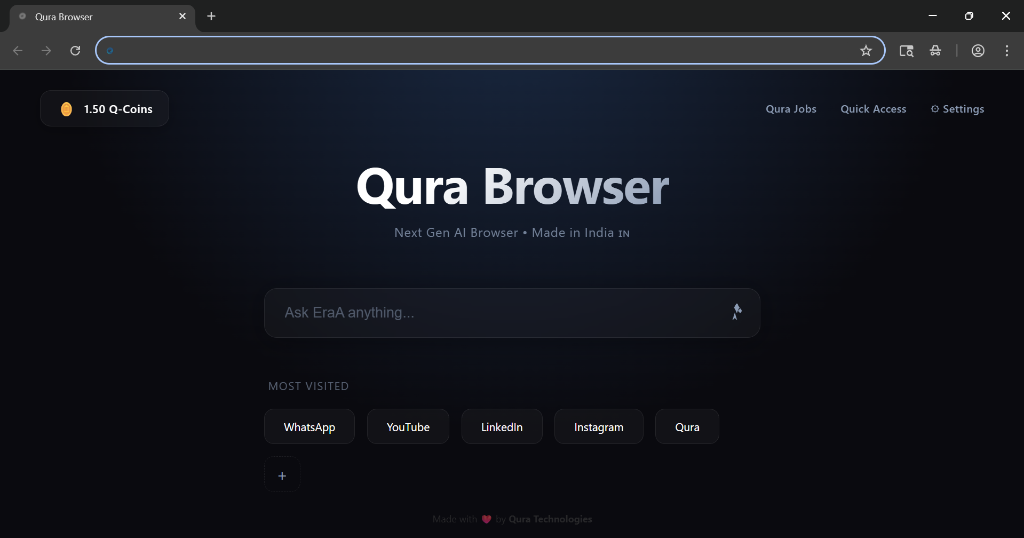
See Qura Browser in Action
Watch the latest unedited walkthrough of Qura Browser Beta v1.0 running on Windows. Experience the native EraA AI search integration, Tommy Mode private workspace, and everyday browsing performance.
In-Tab EraA AI Search
Real-time contextual prompt bar (“Ask EraA anything...”) on the homepage for immediate answers without separate tabs.
Tommy Mode Private Workspaces
Dedicated private session isolation (Ctrl+Shift+N) ensuring local browsing history and session cookies are never retained.
Native Browser Shell & Controls
Refined desktop window experience with custom three-dot browser controls, Quick Access shortcuts, and fluid multi-tab navigation.
Inspect the Real Qura Browser Interface
Review actual product screenshots demonstrating Qura Browser's real interface, custom menu systems, and settings architecture. No mockups or synthetic graphics.
New Tab & EraA Search
The default Qura homepage combines focused minimalism with in-tab intelligence. Features a central 'Ask EraA anything...' input, Q-Coins attention balance, and customizable Most Visited shortcuts.
Designed Around Real Browsing Needs
From native EraA AI search to Tommy Mode privacy, every tool in Qura Browser is built to improve your workflow. We clearly distinguish implemented features from those in development.
EraA Neural Search & Assistant
Embedded AI input right on your homepage and browser shell. Get contextual page summaries, research insights, and direct answers without switching to external apps.
Tommy Mode (Private Browsing)
Dedicated private browsing window (accessible via menu or Ctrl+Shift+N). Prevents browsing history, cookies, and local session traces from saving after closing the window.
Quick Access & Ecosystem Controls
Personalized new tab dashboard featuring direct access to your most-visited websites, Qura Jobs, Qura Ecosystem Dashboard, and quick settings toggles.
Lexora Academic Core
Specialized workspace optimized for students and academic study, synthesizing syllabus notes and filtering digital distractions.
GenZo Developer Utilities
Specialized tools integrated into the right-click context menu, including the Qura Developer Tool, reading mode, and instant inspection shortcuts.
Q-COIN Attention Protocol
Ecosystem incentive layer designed to reward productive study and focused research engagement within Qura Browser.
The Qura Technologies Ecosystem
Qura Browser is the gateway to a cohesive suite of web tools engineered by Qura Technologies. Experience our live platforms and preview upcoming productivity modules.
Live Applications
(3 Active Services)
Qura Meet
High-definition video conferencing and real-time collaboration designed for teams, featuring encrypted rooms, instant link generation, and zero unnecessary friction.
Qura Jobs
Direct talent and career portal connecting tech professionals with verified opportunities, featuring application tracking and developer job discovery.
EraA
Qura's proprietary AI engine powering contextual browsing, research summaries, and interactive assistance across the browser and web apps.
Coming Soon
(2 In Development)
Qura Slides
Collaborative presentation builder featuring structured visual templates, dynamic decks, and streamlined export workflows for modern teams.

Qura Calendar
Intelligent scheduling and time orchestration integrated directly with Qura Meet sessions, focused work blocks, and cross-device reminders.
The Evolution of Qura Browser
Inspect the verifiable progress from our first October 2024 prototype to the current product architecture. Select any recording to review the actual interface iterations.
Key Advancements in the Latest 2026 Build
Homepage features direct AI prompts alongside personal shortcuts, providing quick answers without opening external services.
Private window workspace that isolates memory sessions and leaves zero trace in local disk storage upon closure.
Custom three-dot controls, system settings attribution, and fluid tab manipulation engineered for 64-bit Windows.
Our Journey Since October 2024
Building an independent desktop browser is an intricate engineering journey. Here is a transparent chronicle of the technical decisions, hurdles, and milestones that shaped Qura Browser.
Genesis & Early Interface Experiments
The project started with a clear goal: build a focused, intelligent browser that isn't just an ad-supported portal. The earliest prototypes tested custom UI layouts and exposed the necessity of using a proven, production-grade engine rather than basic web containers.
Desktop Architecture & Custom Interface
Established our core desktop architecture. Built custom UI resources for the New Tab page, settings, account authentication, and the dedicated Tommy Mode private browsing environment.
Native EraA AI Assistant Integration
Integrated EraA AI directly into the browser shell as a persistent side-panel assistant. Faced and resolved challenges in asynchronous token streaming and keeping background AI processing from degrading UI responsiveness.
Closed Beta Refinement & Waitlist Rollout
Stabilizing the core build, optimizing resource handling across multiple open tabs, and organizing the rollout pipeline for the early access Windows preview.
Vaibhav Chaudhary
CHIEF ARCHITECT & FOUNDER
Qura Technologies
“We set out in October 2024 to build a browser that treats intelligence as a native primitive rather than a bolted-on plugin. The journey has been challenging, but our commitment to a solid architectural base and real privacy keeps us moving forward.”
Download Coming Soon
Public downloads will roll out in organized phases to ensure build reliability. Register your platform preferences below to receive your preview link as soon as your build is ready.
Windows
Beta ReadyingOur primary release platform. Packaging the first preview installer for waitlist distribution.
macOS
In DevelopmentPorting the custom Chromium shell and EraA AI side-panel to macOS windowing conventions.
Linux
Planned (Roadmap)Evaluating .deb and AppImage packaging following the initial Windows beta rollout.
Transparent Technical Roadmap
We believe in honest software development. Here is an unvarnished view of what is already built, what is actively being refined, and what lies ahead.
Current Beta Capabilities
- Chromium open-source rendering base
- Integrated EraA AI assistant side panel
- Tommy Mode private browsing session
- Custom New Tab page with settings toggle
- Waitlist and notification infrastructure
In Active Development
- Windows preview installer packaging
- Lexora Academic companion refinement
- GenZo Developer inspection tools
- Multi-tab resource & memory handling
- Initial beta feedback telemetry safeguards
Planned Future Milestones
- macOS & Linux desktop build targets
- Q-COIN ecosystem attention protocol
- Cross-device encrypted bookmark sync
- Ecosystem applications (Slides, Meet, Calendar)
Frequently Asked Questions
Straightforward answers regarding our architecture, release timeline, and privacy approach.
Be Part of the Next Era of Browsing
Reserve your spot for early Windows beta access. Clean updates, direct developer communication, zero spam.